
Adding Defined Benefit Pensions to Your Plan
Missing a Pension Option? See how to add the DB pension fields to your plan here.
A defined benefit pension is a pension plan that pays a set benefit for the length of your retirement.
You can add up to 5 defined benefit pensions to your plan per person. These pensions are added in the Tax & Benefits section in the Discovery Phase.
Use Your Pension Statement
The easiest way to complete the defined benefit pension information is to use your most recent pension statement. Add all values in today's dollars and we will increase them for inflation in the future.

- Pension Name: This name will be used in Adviice charts and tables
- Pension Owner: The person who will be paid by the pension. If you do not see an option for your spouse, make sure that you have selected Defined Benefit Pension in the Profile section. You can see how here.
- Contributing: Select yes if you are actively contributing to this pension from your current employment income.
- Eligible for Income Splitting: Most DB pensions in Canada are eligible for income splitting, but if you are adding a foreign pension, you may want to confirm whether it is eligible with your accountant or pension provider
-
Start Age + x Months: Select the age (your birthday) and then the number of months after your birth month you expect to receive your pension. For example, if you expect to receive your pension the month after you turn 55, you would select: Age 55 + 0 Months.
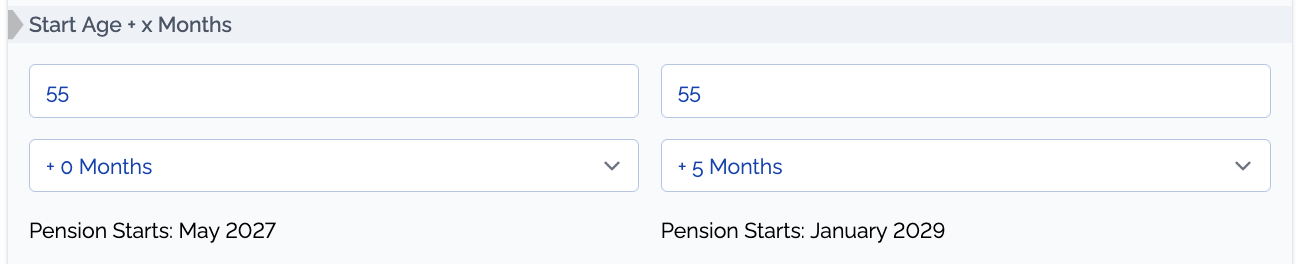
- Annual Benefit Pre-65: This is the dollar amount you would expect to receive each year before the age of 65 (including bridge benefits)
- Annual Benefit Post-65: This is the dollar amount you would expect to receive each year after the age of 65
- Before Start Age: Percent Indexed To Inflation (100% = Fully Indexed): This is the percentage of inflation that your pension increases by each year before you start receiving it. Some pensions are fully indexed to inflation, in which case enter 100%. Some pensions are only partially indexed to inflation between 0% or 60% or 80%
- After Start Age: Percent Indexed To Inflation (100% = Fully Indexed): This is the percentage of inflation that your pension increases by each year after you start receiving it. Some pensions are fully indexed to inflation, in which case enter 100%. Some pensions are only partially indexed to inflation between 0% or 60% or 80%
- Percent Survivor Benefit: This is the percentage of your pension that a spouse or partner would receive after your passing. This is typically 50% to 60% but can range from 0% to 100%.
- Annual Pension Adjustment In $'s: This is the amount that your RRSP contribution room is reduced each year because you have a defined benefit pension. This can be found on your latest notice of assessment. We can help find this information as well after you upload your Notice of Assessment.
Missing an Entry Field?
Certain fields may not be visible to you depending on whether you are receiving your pension or not.
If you are receiving your pension you do not need to provide a Pension Adjustment or a 'Before Start Age: Percent Indexed' value. These fields may be greyed out or not appear at all.
Adding an Additional Pension
You can add another DB pension by clicking the 'Add New Pension' button at the bottom of the DB pension fields.
You are able to add up to 5 pensions per person to your plan. Make sure to fill out all the fields for your added pension to have it included in your plan.

Missing A Pension Option?
The pension options in the Tax & Benefits section is based on the information you shared in your Profile. In the Profile section you can select whether or not you have a Defined Benefit (DB) Pension Plan.
If you're missing a pension option it might be necessary to update your Profile.
Adding a Defined Benefit Pension can be done in the Profile section under Financial Profile. A solid blue button indicates that you are eligible for a defined benefit pension in the future.
